


P.05 — AI · RAG · Data
Dynamic RAG Knowledge Platform — Lumos
Create, fine-tune and manage an organisation's RAG vector knowledge bases from one dashboard, from connected sources to tested ingestion, embedding and retrieval settings.
- Role
- Associate Software Engineer · Lumos R&D
- Year
- 2025 — 26
- Company
- CodeGen International · Lumos

01 — Overview
Overview
The Dynamic RAG Knowledge Platform lets users create, fine-tune and manage their organisation's RAG vector knowledge bases through a UI dashboard.
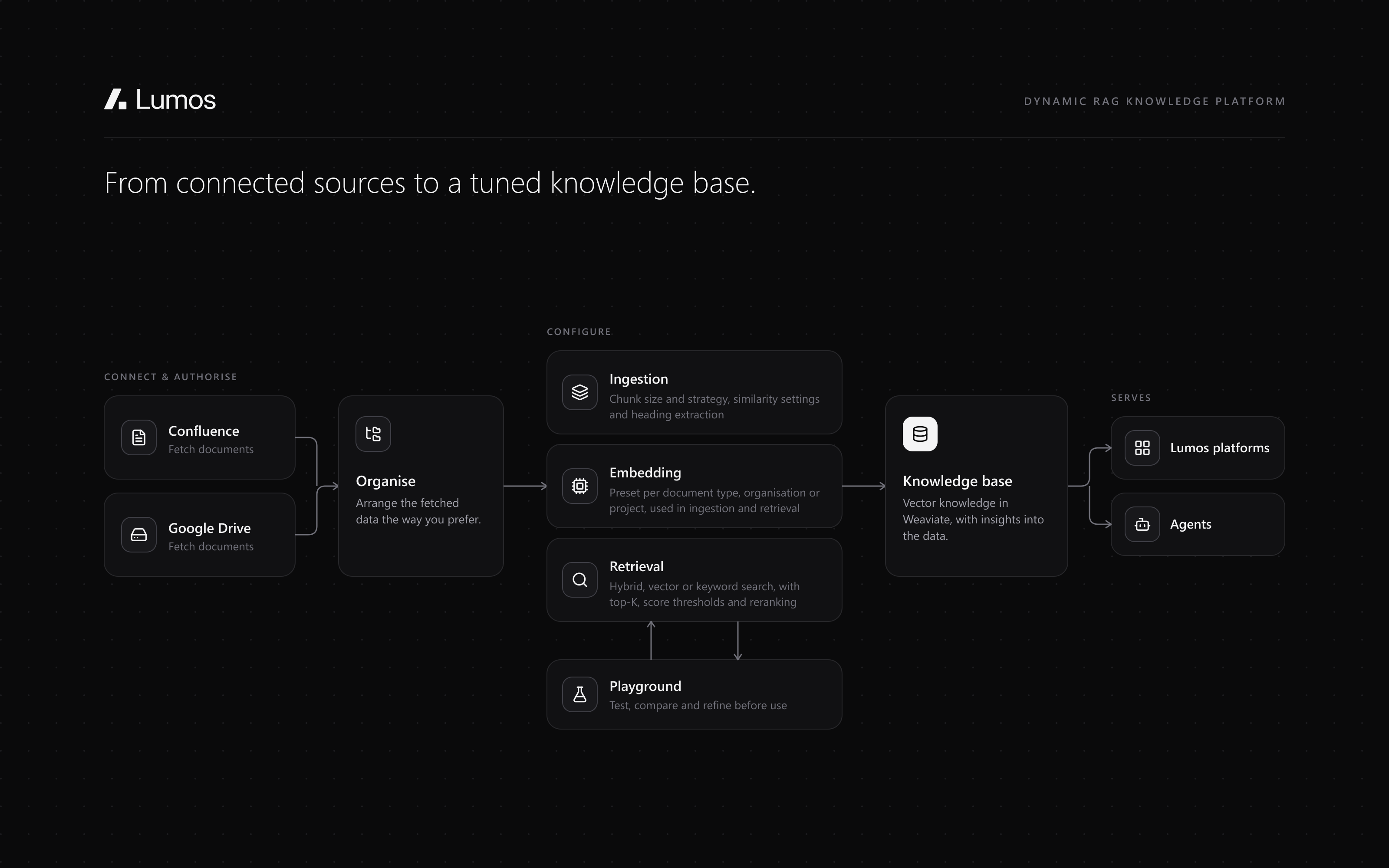
Documents come in from Confluence and Google Drive. Ingestion, embedding and retrieval are configured by document type, organisation or project and tested in a playground, and the resulting knowledge bases can be used across Lumos's other platforms and agents.
02 — How it works
From connected sources to a tuned knowledge base
Every setting is configured in the dashboard and can be tested in the playground before it's used.
- 01
Connect
Connect and authorise Confluence and Google Drive, then fetch documents and data through the UI.
- 02
Organise
Organise the retrieved data however you prefer.
- 03
Ingest
Bulk ingestion by document type, organisation or project: chunk size, chunking strategy, similarity settings and heading extraction.
- 04
Embed
Embedding settings preconfigured per document type, organisation or project, applied during ingestion and retrieval.
- 05
Test
The playground tests, compares, modifies and refines ingestion and retrieval configurations.
- 06
Retrieve
Hybrid, vector or keyword search, tuned per knowledge base and used by Lumos's platforms and agents.
03 — Features
Every setting, in one dashboard.
01External application connectivity
Confluence and Google Drive integrations: connect, authorise access, and fetch documents and data directly through the UI, then organise them as you prefer.
02Ingestion configuration
Bulk ingestion settings by document type, organisation or project, including chunk size, chunking strategy, similarity settings and heading extraction.
03Retrieval configuration
Hybrid, vector and keyword search modes; alpha values, top-K settings and score thresholds; weighted retrieval; and reranking.
04Embedding configuration
Embedding settings preconfigured for the document types, organisations or projects being managed, and applied during ingestion and retrieval.
05Ingestion and retrieval playground
Test, compare, modify and refine ingestion and retrieval configurations before using them.
06Data visualisation and insights
Preview the ingested data, with overviews of it and insights into it.
04 — Technical depth
What it's built with, layer by layer.
- Frontend
- Next.js
- Backend
- FastAPI
- Vector database
- Weaviate
- Database
- MongoDB
- Connectors
- Confluence · Google Drive
- Retrieval
- Hybrid, vector and keyword search · Weighted retrieval · Reranking
05 — Gallery
In pictures.
Internal product: its screens are under NDA, so these are illustrations of what it does, not its interface. Happy to walk through it in an interview.
06 — Outcome
Where it landed.
2
Connectors
Confluence and Google Drive
3
Search modes
hybrid, vector and keyword
3
Config scopes
document type, organisation or project
The knowledge bases it produces can be used across Lumos's other platforms and agents, whenever and wherever they're needed.