


P.04 — AI · Agents · Design
Agentic Design Workspace — Lumos
An agentic design workspace, like Claude Design: plan a whole product, design a screen or generate design guidelines, then prototype, share and export it for coding agents to build.
- Role
- Associate Software Engineer · Lumos R&D
- Year
- 2025 — 26
- Company
- CodeGen International · Lumos

01 — Overview
Overview
The Agentic Design Workspace is another major Lumos product, similar to Claude Design, available in the desktop app and on the web.
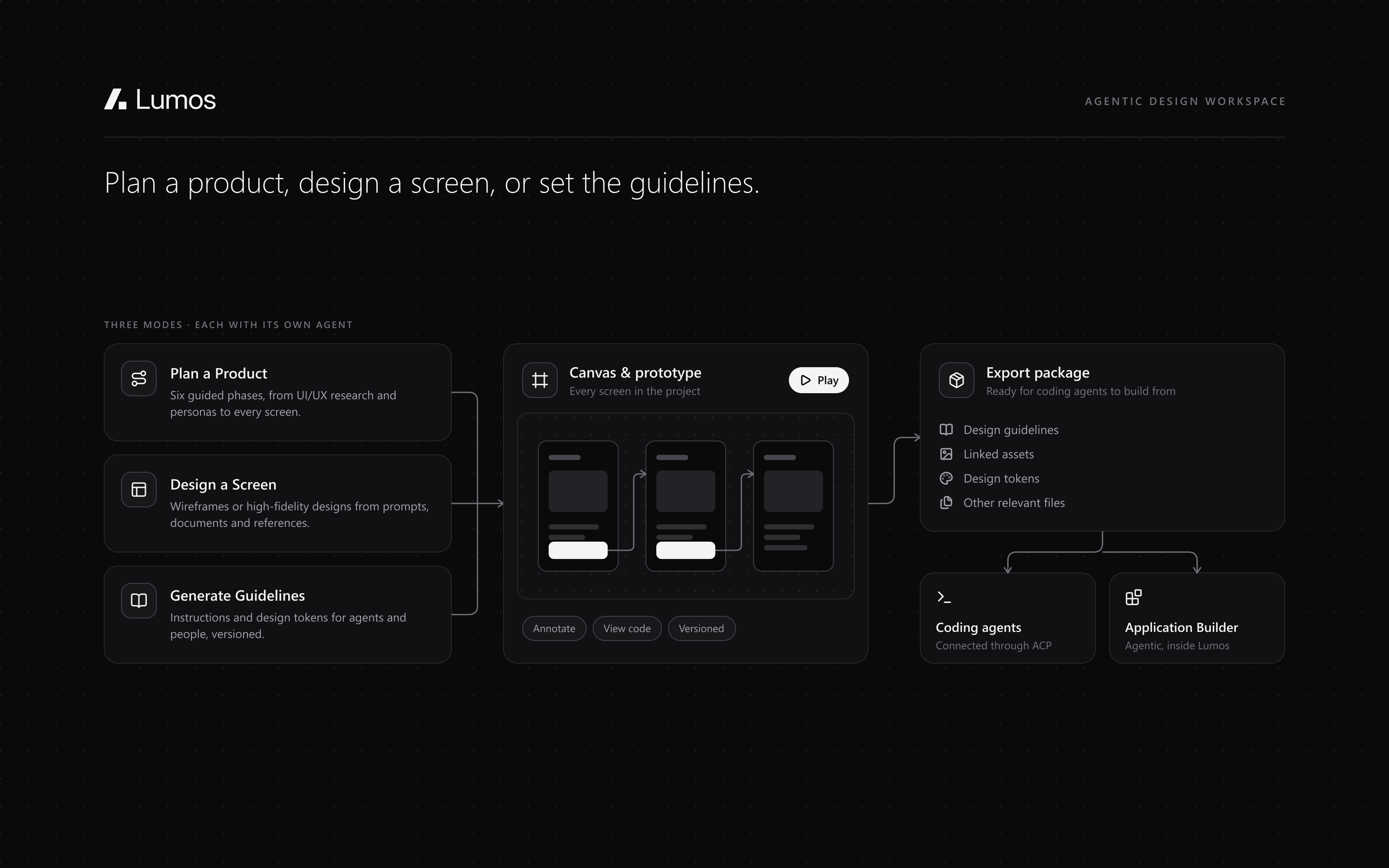
It has three modes — Plan a Product, Design a Screen and Generate Guidelines — each with its own agent, plus a prototyping mode. The agents are built with LangGraph and LangChain and support OpenAI, Claude and Gemini.
Finished designs are exported as a package that coding agents can build from, either through ACP inside the platform or with the Agentic Application Builder.
02 — How it works
Plan a Product, in six phases
Proper UI/UX research and a complete application design, through a structured, phased process. Each phase is a guided natural-language conversation with Q&A, artifact creation, previews and user approval.
- 01
Project understanding
Understanding the project and its requirements.
- 02
Design direction
Creating the design guidelines.
- 03
User experience
Creating user personas and user flows.
- 04
Screen architecture
Generating the sitemap and individual screen plans.
- 05
Build order
The complete implementation order, including anchor and reference screens.
- 06
Build
All screens generated, sequentially and in parallel, to the plan. An AI-generated prototype then connects them, so the whole flow is playable.
03 — Features
Three modes, a prototype and an export.
01Plan a Product
UI/UX research and a complete application design in six guided phases. When every phase is complete the screens are generated, and an automatic AI-generated prototype maps the connections between them, making the entire application flow playable.
02Design a Screen
Wireframes or high-fidelity designs from reference images, documents and natural-language prompts, with the LLM of your choice: Claude, OpenAI or Gemini. Designs can be previewed, annotated and modified, the generated code is visible, and follow-up screens come from a conversation about an existing screen.
03Guidelines, versions and canvas
An existing design guideline can be attached to screen generation. Generated screens and UI modifications are versioned, and a canvas shows all the screens created under a project.
04Generate Guidelines
A structured design-guideline file of instructions and design tokens that both agents and humans can follow, generated from documents and reference images. Guidelines are versioned, so users can make changes and preview different versions.
05Prototyping
Draw screens manually, connect them through buttons, and create and play interactive prototypes — or let the prototyping agent generate the entire prototype automatically.
06Sharing
A shareable publishing link invites people to view a prototype. Access is restricted to people with permission, and they can comment on it.
07Export and integration
Export produces a package of design guidelines, linked assets, design tokens and other relevant files, so coding agents can start building the application directly — through ACP inside the platform, or with the Agentic Application Builder.
04 — Technical depth
What it's built with, layer by layer.
- Frontend
- Next.js
- Desktop app
- Electron
- Backend
- Python · FastAPI
- Prototype previews
- Node.js server
- Agents
- LangGraph · LangChain
- Models
- OpenAI · Claude · Gemini
- Integration
- Agent Client Protocol (ACP)
05 — Gallery
In pictures.
Internal product: its screens are under NDA, so these are illustrations of what it does, not its interface. Happy to walk through it in an interview.
06 — Outcome
Where it landed.
3
Modes
each with its own agent
6
Phases
in Plan a Product
2
Surfaces
desktop app and web
3
Model providers
OpenAI, Claude and Gemini
Designs don't stop at a mock-up: they leave as a package of guidelines, tokens and assets that coding agents can build from, through ACP inside the platform or in the Agentic Application Builder.